Plot-LV FOV · free CCTV planning tool

Free CCTV field of view calculator & layout planner

Drop in a floor plan, place cameras and see exactly what each one covers: field of view, pixels per metre and DORI ranges, with walls and doors blocking the view.

Create free account
Free, open nowRuns in your browserPlans stay on your device
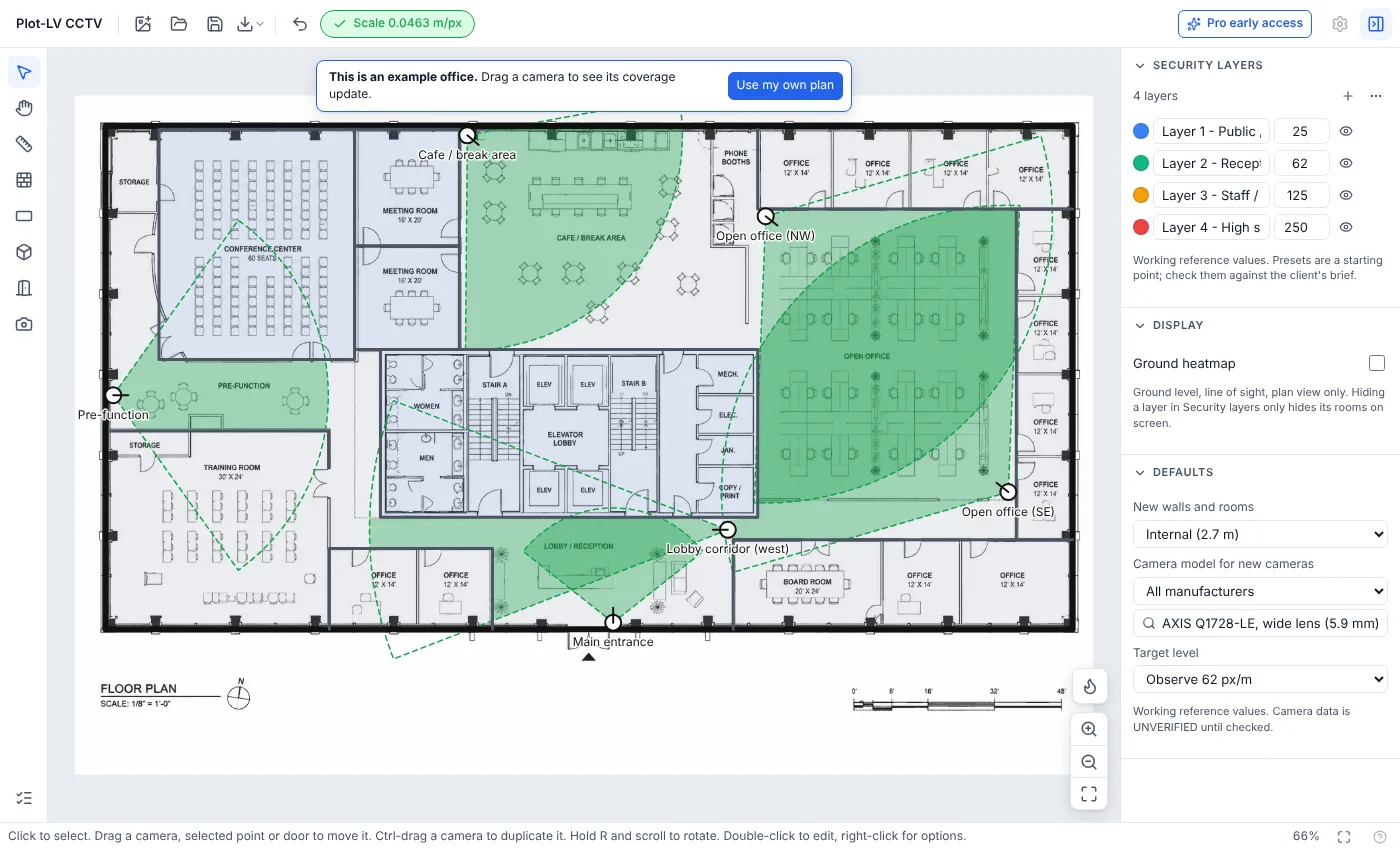
Plot-LV FOV showing an office floor plan with six CCTV cameras and their green coverage areas
The example office that opens with the planner. Drag a camera and the coverage updates.

What it works out for you

The checks you'd otherwise do with a lens calculator, a ruler and a lot of guesswork.

Field of view on your plan

Each camera draws its real coverage wedge, from the model's published horizontal field of view.

Pixel density (px/m)

See where a camera is good enough to detect, observe, recognise or identify a person.

Walls block the view

Walls, doors and obstacles cut the coverage by height, so blind spots show up.

Security layers

Give each room a target level and get a pass or fail coverage check per room.

Camera point of view

Preview roughly what a camera will see from where you've put it.

Save and export

Save the project as a file to pick up later, and export the plan as a PNG.

How it works

A first layout takes a few minutes.

  1. 01

    Open your floor plan

    A PDF, PNG or JPG. No plan to hand? Start from the example office.

  2. 02

    Set the scale and walls

    Click both ends of a dimension you know, then trace the walls and doors that matter.

  3. 03

    Place cameras, check coverage

    Pick models from the library, drag them into place and see coverage and pixel density update live.

Pixel density & DORI, in plain English

How much detail will this camera actually give me?

A camera's field of view is how wide it sees. The further from the camera, the wider the scene, so its pixels are spread more thinly. Pixel density measures that: the number of horizontal pixels covering one metre of the scene (px/m).

A 1920-pixel camera looking at a scene 7.7 m wide gives about 250 px/m, enough to identify someone. The same camera at a point where the scene is 31 m wide gives about 62 px/m: you can see what's happening, but not who it is.

DORI names those levels. The figures below are from EN 62676-4, the European standard for CCTV application. Pick the level you need in FOV and it shows where each camera meets it, so you can see where a camera stops being useful for the job.

The full guide: how to calculate field of view and pixel density →
Field of view and DORI distances for each camera model →
DORI levels (EN 62676-4)
Levelpx/mWhat you get
Detect25You can tell a person is there.
Observe62You can see what they're doing and what they're wearing.
Recognise125Someone who knows the person can say who it is.
Identify250Enough detail to identify a stranger beyond reasonable doubt.
FOV Pro · coming soon

Pro is for real jobs

The free version handles image and PDF plans. Pro adds the parts that save time on every project:

  • CAD import: open DXF drawings with sharp lines and layers, scale set automatically
  • Walls taken straight from your CAD wall layer, no tracing
  • A coverage report to hand to your client
  • Pixel density and DORI calculations per camera, no camera limits

Early members get a founding price and a say in what gets built first.

I'll only use this to contact you about FOV Pro early access. Privacy notice

Questions

Is it really free?

Yes. The free version is open now with no card and no account needed: choose "Open the planner" and you go straight in. A paid Pro version with CAD import and client reports is coming; the free version stays.

Do my floor plans get uploaded anywhere?

No. Plans are opened and processed in your browser, on your device. Your project is saved as a file on your computer when you choose to save it.

What file types can I open?

PDF, PNG and JPG floor plans in the free version. CAD drawings (DXF) open with FOV Pro. Using DWG? Save it as DXF from your CAD software.

How many pixels per metre do I need to identify a face?

EN 62676-4 sets 250 px/m for identification and 125 px/m for recognition. FOV shows where each camera reaches those levels on your plan, so you can see how far out a camera stays useful.

Which cameras are in the library?

40 models from 14 manufacturers, including Axis, Hikvision, Hanwha Vision, Avigilon, Bosch and Dahua, using each model's published field of view. Data is marked unverified until it has been checked against the manufacturer's datasheet, so check critical figures before you commit.

Does it work on a phone?

It opens on a phone, but placing cameras and drawing walls is much easier on a laptop or desktop with a mouse.

Plan your next CCTV layout in your browser

Free, no card, no sign-up. Your plans never leave your device.

Also from Plot-LV: Flame, fire alarm layouts against BS 5839-1 (not on sale yet).