Not available to buyFlame is in closed development and isn't on sale. This page shows how it works.
Plot-LV / Flame — Product tour

Know exactly
what it checks.

Flame is a desktop tool for designing and validating fire detection & alarm layouts to BS 5839-1:2025. Import a floor plan, trace the building, drop real catalogue devices — and watch 17 automated checks score coverage, audibility, call-point reach, zoning and escape routes as you work. Then export a report a competent person can put their name to.

17 automated checks100% offlineWindows
VALIDATION REPORT · LIVE● PASS / FAIL PER ROOM
Plot-LV Flame validation report beside a floor plan with wall-aware detector coverage

See it working

Real screenshots from the current build — this is the tool you get, not a mock-up.

WATCH IT WORK● LIVE BUILD
See Flame in action — from importing a floor plan to a validated, exported report.
THE WORKSPACE● LIVE BUILD
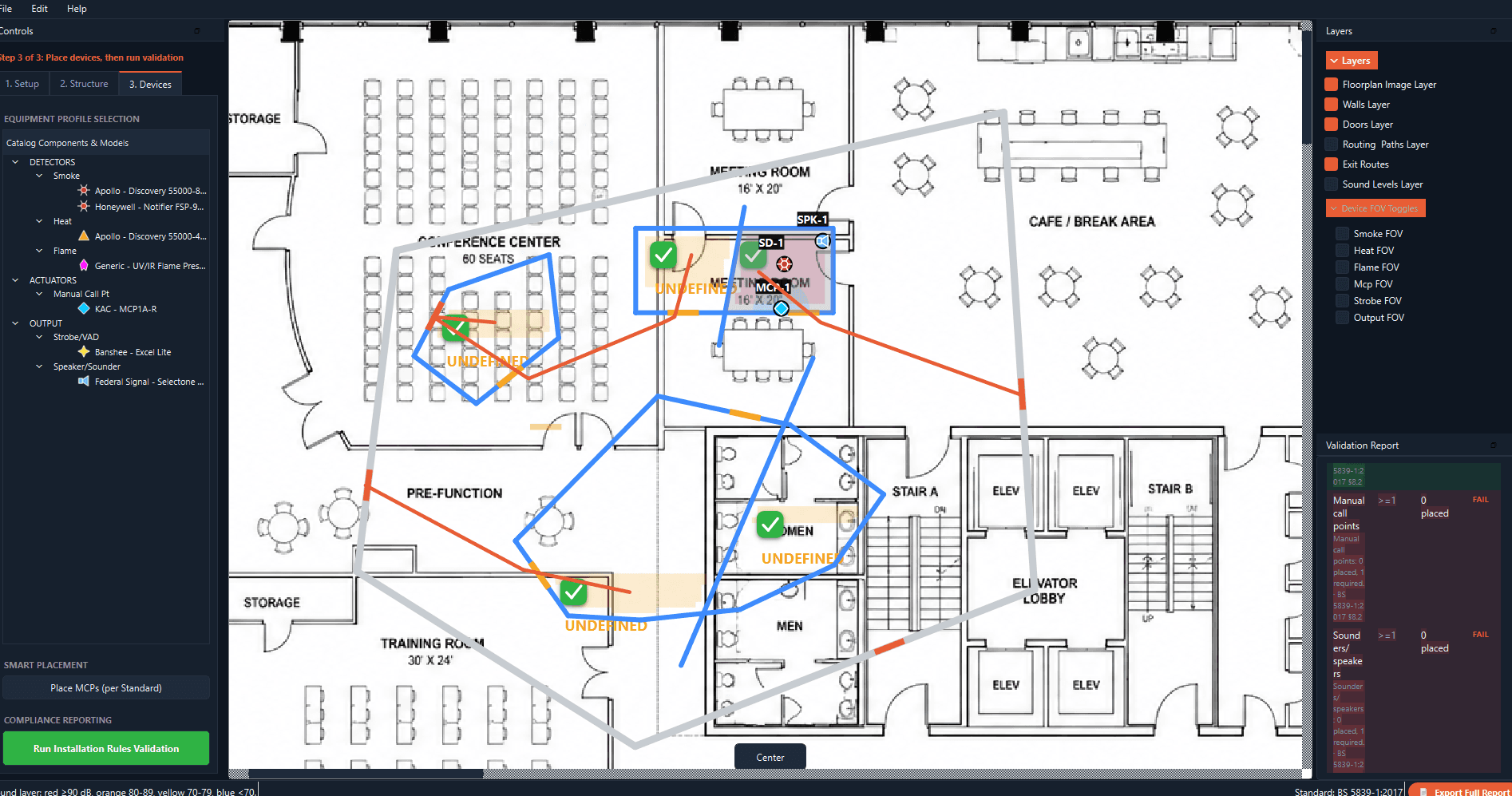
Plot-LV Flame full application window showing a traced floor plan, device catalogue, layer toggles and a live validation report
The full workspace: device catalogue on the left, your plan in the middle, layers and the live validation report on the right.
LIVE VALIDATION● LIVE BUILD
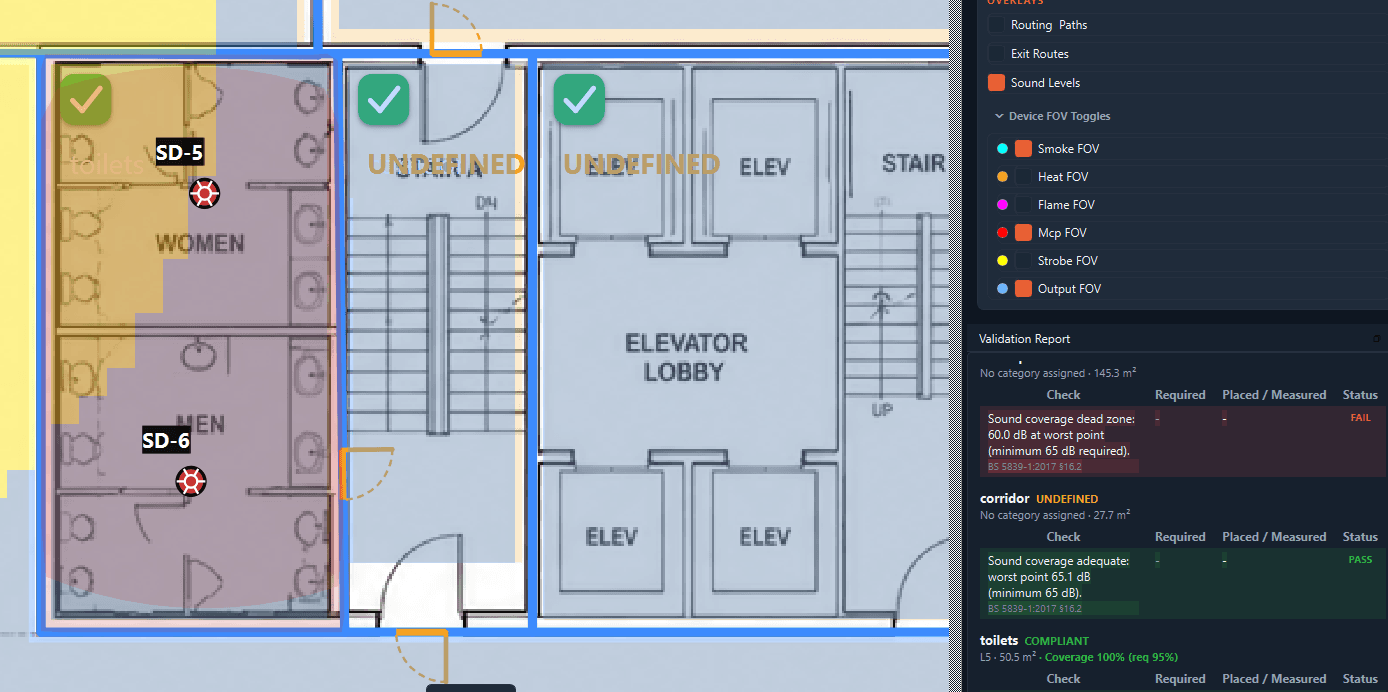
Close-up of wall-aware detector coverage shading and a per-room validation report with PASS and FAIL rows
Every room gets a line-by-line verdict — check, required, measured, PASS or FAIL — updating as you place devices.
COVERAGE YOU CAN SEE● LIVE BUILD
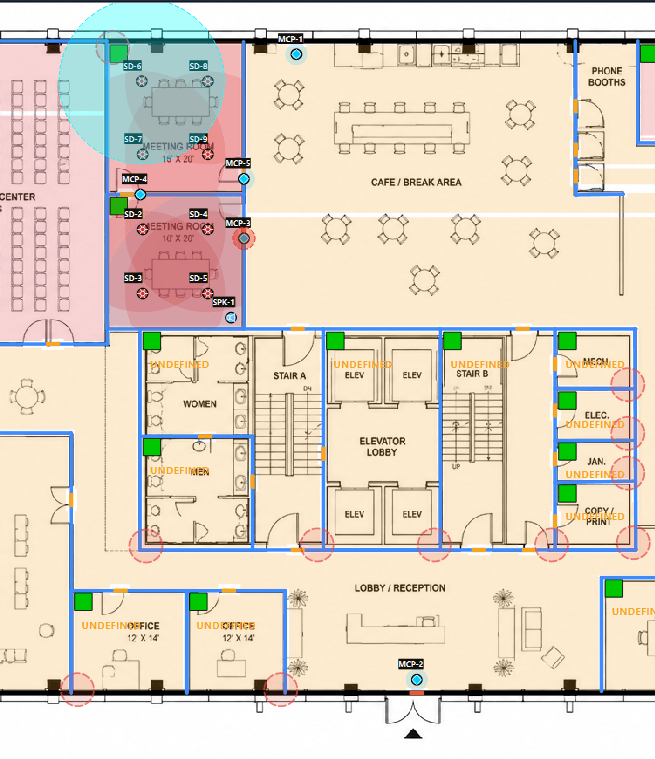
Floor plan with smoke detector coverage areas, manual call points and rooms shaded by compliance state
Detector coverage drawn on the plan itself — walls block it, doorways pass it, gaps show up in red before they cost you a site visit.
ESCAPE ROUTING● LIVE BUILD
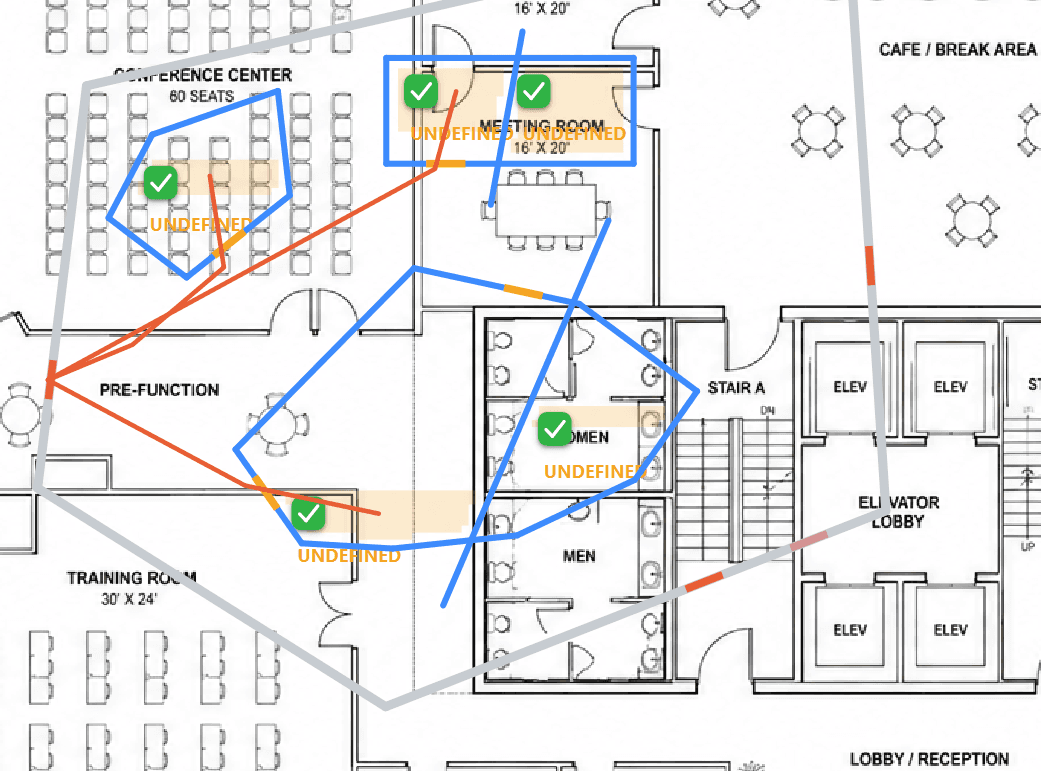
Floor plan overlaid with computed escape routes, fire zones and compliant room ticks
Routed escape paths from every room to its nearest exit — real walking routes around walls, not straight lines through them.

How it works

Four steps from a flat floor plan to a validated, documented design.

01

Import & scale

Load a floor plan — PNG, JPG, BMP or a page from a PDF — as a locked backdrop. Measure one known distance on the plan and the whole drawing snaps to real-world units: metres, feet, whatever you work in.

02

Draw the building

Trace walls over the backdrop with line, rectangle and polygon tools — snapping keeps you square. Then hit Detect Rooms and Flame finds every enclosed space for you to accept or reject, ready for categories and fire zones.

03

Place the devices

Drop detectors, sounders, call points and VADs from a catalogue of ~33 real devices — Apollo, Hochiki, Notifier, C-TEC, Eaton, KAC, Federal Signal — each carrying its EN 54 data. Compliant placement pulses green; a violation glows the room red, instantly. Stuck on a gap? “Suggest placement” proposes compliant positions as ghost markers you accept one by one.

04

Validate & export

Seventeen automated checks run across every room and the whole building, and a line-by-line table shows check / required / measured / status. Export a PDF report with an executive summary, per-room pages, zone plan, documented variations, a device schedule (plus CSV) and a designer sign-off block — under your logo.

One thing Flame doesn't do: read walls out of the image for you. The backdrop is a visual reference you trace over — auto-vectorising a raster plan is on the roadmap, not in the box.

The coverage model

Not a circle on paper.

Most spacing checks pretend a detector covers a perfect circle. Walls disagree. Flame casts 96 raysfrom every detector; each ray stops at the first wall it hits and passes through doorways. The result is the detector's true, wall-clipped field of view — a detector on the far side of a partition gets no credit for the next room.

The room is then sampled on a ~1 metre grid, and coverage is the fraction of points inside at least one detector's field of view — compared against your category's requirement, with any uncovered floor area reported in m².

What it is: a rigorous line-of-sight and range model — the right first-order answer for spacing and layout. What it isn't: a smoke-transport simulation. Ceiling-height effects get their own warning rule; stratification and beam obstructions stay with the designer.

RAYCAST FOV · 96 RAYS● WALL-AWARE
SMOKE 01.1UNCOVEREDZONE 01ZONE 02

The 17 checks, in full

No black box. Here is every rule the engine runs, what it measures, and how pass or fail is decided — the same detail we'd want before trusting a tool ourselves.

THE CORE PRINCIPLE —Flame is a design accelerator and error-catcher, not an automated approving authority. BS 5839-1 requires a named, competent person to own the design; Flame's job is to make that person faster and catch what a manual pass would miss. That's why every exported report carries a designer sign-off block, never an "APPROVED" stamp.

Required devices presentFAIL

Does the room have the minimum count of each device type its BS 5839 category demands — smoke, heat, MCP, sounder, VAD? The most basic “did you put the right kit in” check.

Room has at least one deviceFAIL

Catches the classic slip: a room given a category, then left with nothing in it.

Detection coverageFAIL

The wall-aware raycast model, sampled on a ~1 m grid, against the category's required coverage (e.g. ≥95% for L1). Turns “there are detectors in the room” into “the whole room is actually covered” — and reports the uncovered m² when it isn't.

Detector spacingFAIL

Worst-case gap between same-type detectors against the standard's maximum spacing. Thresholds come from the standards library, not hard-coded.

Detector distance from wallFAIL

Flags detectors inside the “dead air” zone where wall meets ceiling, using per-type minimum clearances from the standard.

VAD (visual alarm) coverageFAIL

Rooms that require a visual alarm are checked for actual strobe reach, not just the presence of a beacon — only devices with an EN 54-23 coverage code count. Spatial reach is modelled; photometric compliance stays with you.

Sound coverageFAIL

The quietest point in the room against the minimum SPL (default 65 dB(A)), using inverse-square projection from every sounder. A sizing sanity-check, not an acoustic simulation — and the page says so.

MCP reach at the doorFAIL

Every door in a room that needs manual call points has an MCP within the standard's door distance — because people raise the alarm on the way out.

Maximum travel distance to an MCPFAIL

Genuine walking distance to the nearest call point — routed around walls, through doors — against the limit (default 45 m, tightened to 25 m for rooms flagged mobility-impaired).

Exit route reachableFAIL

A* pathfinding from every room to its nearest fire exit. A room with no route to an exit is a life-safety defect, and it's flagged on the canvas too.

Fire-zone device & area limitsFAIL

Each detection zone against the standard's maximum floor area and device count — zones exist so a fire can be located fast.

Zone plan presentFAIL

BS 5839-1:2025 makes the zone plan a requirement in its own right: a multi-room system with zero zones fails, and the report withholds its zone-plan page until one is drawn.

Zone search distanceWARN

Walkable distance to search a zone end-to-end against a recommended maximum (default 60 m), measured centre-to-farthest-room.

Ceiling height limitsWARN

Point smoke above 10.5 m or point heat above 9 m draws a warning — beam or aspirating detection should be considered. A warning, not a fail: the designer makes the call.

Sleeping-risk detection typeWARN

A room flagged “occupants sleeping” that relies on heat-only detection is warned — heat responds too late for escape while asleep.

Orphaned deviceWARN

A device floating outside every defined room protects nothing and isn't counted anywhere — usually a drawing slip.

Heat-appropriate room typeINFO

Kitchens, plant and boiler rooms relying on optical smoke only get an advisory — steam and fumes cause false alarms. Informational, never a failure: it's a judgement call.

A green room means every applicable check above passes — geometry, counts, spacing, coverage, audibility, call-point reach, zoning and escape routing all hold together. It is a meaningful bar. It is not a signed-off BS 5839 design — that signature is yours.
What stays with you

We'd rather tell you the limits up front than have you discover them later. These remain the competent person's responsibility — and the report says so.

Category selection & risk assessment
You choose the category; Flame checks the layout against it, but doesn't judge whether it's right for the risk.
Cause & effect / control matrix
Not modelled.
Power supply, standby battery & cabling
EN 54-4 capacity and volt-drop calculations are not modelled.
EN 54-23 photometric VAD compliance
Spatial reach is checked; the illumination volume is not.
Acoustics across partitions
Sound is free-field inverse-square only — wall attenuation isn't modelled.
Beams, skylights, ventilation, stratification
Ceiling-height warnings only; obstruction geometry isn't modelled.

The fine print, up front

Standard
BS 5839-1:2025 by default. Rules read their thresholds from a JSON standards library — the 2017 edition (superseded) and an NFPA 72 preset ship too, and new codes are a data edit, not a rewrite.
Clause citations
Topic-based against the 2025 standard, with clause numbers deliberately marked TBC rather than guessed — the 2017 renumbering means we won't assert sub-clauses we can't verify. Confirm against your copy before quoting.
Privacy
100% offline. No cloud, no account, no upload — nothing is transmitted anywhere. NDA-safe by construction.
Platform
Windows, one standalone .exe. No AutoCAD, no Revit, no host CAD package.
Project safety
Versioned save format, autosave every 2 minutes with crash recovery, 200-step undo/redo.
Getting started
A one-click demo project with a deliberate failure to find and fix, plus first-run coach marks.

Flame isn't on sale yet

Register and you'll hear when it opens. In the meantime, FOV, our CCTV coverage tool, is free to try.